At a glance
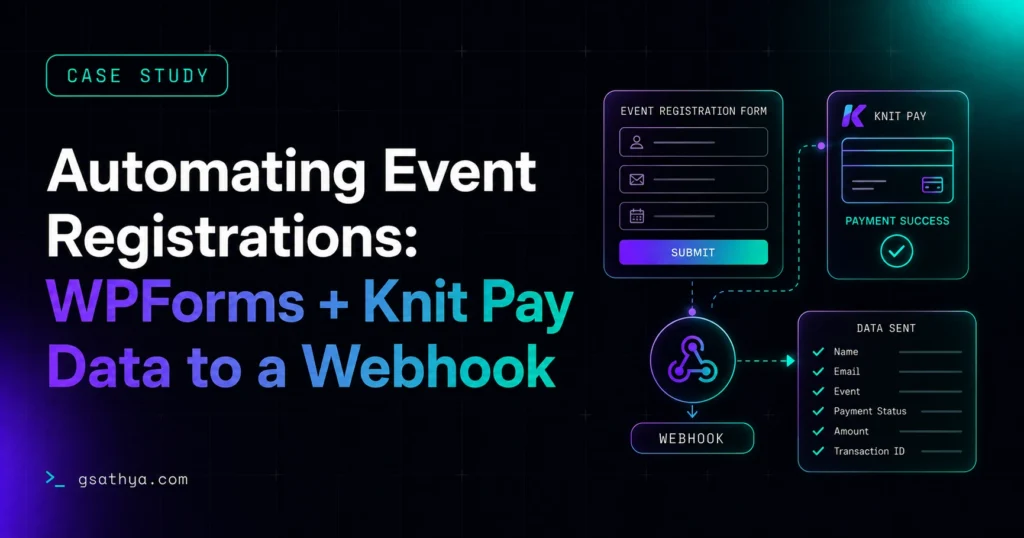
An events business sells class and workshop registrations through WPForms with Knit Pay for payments, on event pages built with ACF. I built a custom plugin that does two jobs: it auto-fills the form hidden fields with the event details straight from ACF, so every registration captures the right event, date, price and language; and when the Knit Pay payment succeeds, it sends the complete registration plus payment details to any webhook as JSON, ready to drop into a CRM, spreadsheet or automation tool.
WPForms Knit Pay webhook is a real-world case study of a custom plugin I built. An events business sells class and workshop registrations through WPForms with Knit Pay for payments, on event pages built with ACF. I built a custom plugin that does two jobs: it auto-fills the form hidden fields with the event details str…
What the client needed
An events business sells places on classes and workshops directly from its website. Each event is a WordPress Event post built with ACF (Advanced Custom Fields) for details like date, class name, time, language and price, and each event page carries a WPForms registration form that takes payment through Knit Pay.
Two things were slowing the team down. First, every registration form had to capture which event it was for, along with that event’s details — and doing that by hand was slow and error-prone. Second, once someone paid, the registration and payment details stayed inside WordPress, so getting them into the tools the team actually works in (a CRM, a spreadsheet, an automation) meant manual exporting. They wanted both problems solved automatically.
The challenge
- Capture the right event, every time. The form had to record the event’s details automatically from the event page, without staff copying values into hidden fields.
- Only send real, paid registrations. Data should leave the site only when a Knit Pay payment actually succeeds — not on every submission or a failed attempt.
- Fit any downstream tool. The payment and registration data had to arrive in a clean, predictable format a CRM, spreadsheet or automation platform could read without custom parsing.
- Stay configurable. New events, new fields and a changing webhook URL all had to be handled from the dashboard, not in code.
The solution
I built a custom plugin that does two connected jobs, both controlled from a single settings page under Settings → Knit Pay Event Webhook.
1. Auto-fill event details into the form
On an event page, the plugin fills the WPForms hidden fields from that event’s ACF values using a simple field map — one line per field in the form WPForms Hidden Field Label = acf_field_name. So fields like Event Date, Class Name, Time of Day, Language and Price are populated straight from the event, and every registration is tied to the correct event automatically.
2. Send everything to a webhook on successful payment
When a Knit Pay payment succeeds, the plugin gathers the full WPForms entry together with the payment details and posts it as JSON to a webhook URL you configure. From there it can flow into a CRM, a spreadsheet, or an automation tool such as a no-code workflow builder.
How it works
The auto-fill runs on WPForms’ field-properties filter, but only on single event pages and only for the hidden fields listed in the map, so it never touches normal fields or other forms. Values are read from ACF for the event currently being viewed.
The webhook runs on Knit Pay’s payment-status hook (knit_pay_payment_status_update). It only fires when the payment’s status is one you have chosen (Success by default), and only for the WPForms source, so failed or unrelated payments are ignored. It then builds a payload containing the payment id, transaction id, order id, status, amount and currency, the customer’s name, email and phone, the form entry id, and every field from the WPForms entry. The form fields can be flattened to the top level or nested under a form_fields key, whichever the destination prefers, and the request can be blocking or non-blocking with a configurable timeout.
Everything — the webhook URL, which statuses trigger it, the payment source, the payload format, the event post type and the field map — is editable from the settings page, so the team can add events, map new fields or point the data elsewhere without a developer.
Why it matters
This turns a manual, copy-and-paste registration process into a hands-off pipeline. Each paid registration automatically carries the right event details and lands instantly in the tools the team uses, so confirmations, records and follow-ups can be automated. It is accurate, it only sends genuine paid entries, and it stays entirely in the owner’s control from one settings screen.
Key results
- Every registration automatically captures the correct event details from ACF
- Complete registration and payment data is pushed to a webhook the moment a payment succeeds
- Connects to any CRM, spreadsheet or automation tool, with no manual export
- Fully configurable from a settings page: webhook URL, trigger statuses and field map
Tech stack
Frequently asked questions
How do you send WPForms and Knit Pay payment data to a webhook?
When a Knit Pay payment succeeds, the plugin fires on the payment-status hook and POSTs the full WPForms entry plus the payment details as JSON to a webhook URL you set. From there the data can flow into a CRM, spreadsheet or automation tool.
Can event details be filled into the WPForms form automatically?
Yes. On an event page, the plugin auto-fills WPForms hidden fields from the event ACF values using a configurable map of hidden-field label to ACF field name, so every registration captures the correct event details without manual entry.
What data is included in the webhook payload?
The payment id, transaction id, order id, status, amount and currency, the customer name, email and phone, the form entry id, and every field from the WPForms entry. Form fields can be flattened to the top level or nested under a form_fields key.
Can I control which payment statuses trigger the webhook?
Yes. From the settings page you choose which statuses fire it (Success by default), the payment source to match, the timeout, whether the request is blocking, and the payload format.
Do I need to write code to connect a new event or field?
No. You map WPForms hidden-field labels to ACF field names in the settings textarea, one per line. New events and fields are handled from the dashboard with no code.
Want a Similar High-Converting Result for Your Business?
I am Sathyaseelan G., a senior freelance WordPress & Shopify developer with 10+ years of experience. Work directly with me with zero agency overhead, fast delivery, and proven performance.
Request a Free Quote →